Twas The Night Before C4

October 19th, 2006

I’m leaving for C4 tomorrow, which is sort of my way of making up for missing WWDC this year. I’m excited to meet lots of people in person who I’ve come to know through the bit paths of the internet.

It occurred to me that most people at the conference won’t know me when they see me. I don’t make a habit of pushing my own photos. No Flickr feed to speak of, etc. So here’s my rare act of self-publicity. Maybe this picture will encourage you to come up and introduce yourself.

The photo is sort of a rough approximation of what I look like right this moment. It’s what my MacBook Pro thinks I look like, at least. I actually have green eyes, not blue. And I’m not quite as pale as that. But it does hide my blemishes well!

See you in Chicago!

Start Routine At Login

October 19th, 2006

Luis over at Happy Apps is heavy in to the FlexTime habit, and asked me if I would consider adding a feature such that routines would automatically start as soon as they are opened. Why? Because he uses his FlexTime “break reminder” routine every day, and has FlexTime set to open up as part of his “Login Items” list. But he still has to remember to click the “Run” button before he gets started with his work.

I think some kind of “auto-start” idea is good, but I suggested a workaround that should work in the mean-time. By using FlexTime’s scripting mechanism to both open and start a routine, anybody can build a “routine starter” applet and keep it handy for this type of use.

Open Script Editor, and paste in the following script:

tell application "FlexTime"
  open "/Users/daniel/Documents/Break Reminder.flextime" as POSIX file
  set running of document 1 to true
end tell

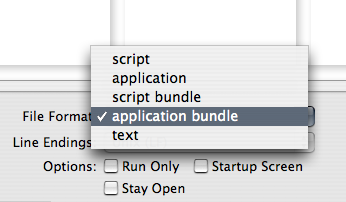
You’ll have to edit the path to match the routine you want to run, of course. Now select “Save As” from the File menu in Script Editor, and select “Application Bundle” from the File Format popup menu:

Save the script application wherever you like. For instance, you could just pop it into your applications folder.

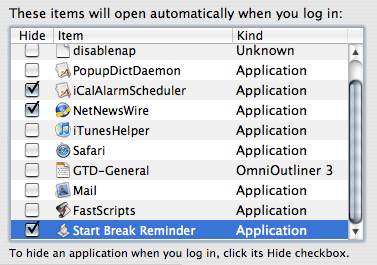
Now open up Login Items from the “Accounts” pane in System Preferences. Drag the resulting script application right into the list:

Now whenever you login in to your computer, the selected routine will start automatically. If you want to start several routines at once, just edit the script to add more “open” and “set running of document 1” lines.

This same technique can be used to add “Routine Starters” to the sidebar in the Finder, or the Dock. Just drag the resulting script application in and it will always be available to you.

FlexTime 1.1a1

October 19th, 2006

One of the most common requests from FlexTime users is that the elapsed and remaining time for routines should be displayed in a more easily readable form then as a teeny pie-chart. So I’ve been planning to add some additional UI to reflect this information while a routine is running.

But I’m sort of blocked on how to do it right. I thought I’d use the unused real-estate in the “Activity Is Running” details pane, but it was hard to find a good compromise between “so big that it dominates the section” and “too small to be guaranteed easily readable.”

So I need some feedback. If you care about this feature I’m hoping you’ll try FlexTime 1.1a1 and report back with your observations. Ideally you’ll be so inspired that you’ll come up with a mock-up image of how you think the information should be conveyed.

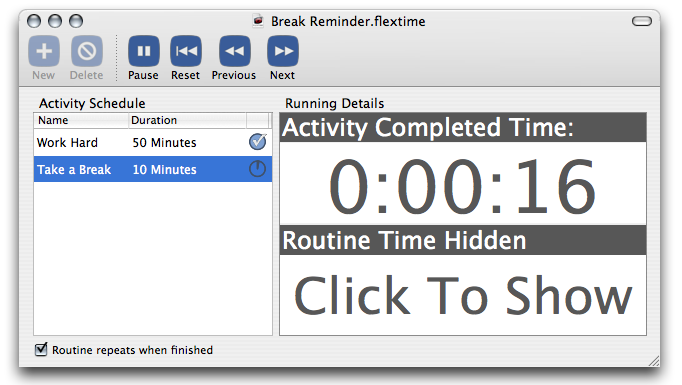
For the time being I’ve decided to GO BIG and make the feature as useful as possible to those who have been patiently waiting for something. So while you’re running a routine in FlexTime 1.1a1, you’ll bold graphical feedback:

Note that the top portion reflects just the current activity, while the bottom portion reflects the entire routine. Click either one to adjust whether it shows the completed time, remaining time, or just stays quiet. If you save the document after clicking, it will stick with the document when you reopen it.

I really doubt this will be the final UI for this feature, but I need some inspiration before I can finish it up. Thanks for trying it out and sharing your comments!

NOTE: I’ve only made the UI changes in the English localization, so if you’re using German you won’t see the changes unless you turn off the German localization for the app.

Tangerine Dream App

October 19th, 2006

The boys at Potion Factory are at once inspiring and depressing. It seems that in the space of time it takes me to think about an app and decide to maybe, sorta get started on it, they’re able to design and implement a totally functional, fun, and beautiful app that completely exceeds my expectations. Either I should take heart in seeing that determination and hard work can produce gorgeous results, or I should give up and choose a new career.

Tangerine has a very clear primary goal: analyzing your music’s beats per minute (rhythmic speed) and intensity. And it achieves this goal with splendor. I love how, upon launching the application for the first time, it doesn’t waste any time asking me whether I want to analyze my music, it just gets to work.

The application has just made my life better. If nothing else, I now I have a BPM value assigned to all of my iTunes tracks. How cool is that? The last time I looked into this problem, the only solutions available involved listening to your music while tapping the mouse to the beat. Ugh! Tangerine fixes this quickly and begs the question: why doesn’t iTunes do this for me? In my brief tests, the BPM and beat intensity values are very accurate. If it happens to pick up on the wrong emphasis, it might predict a BPM value that is either twice or half as fast as you really feel it. In that case, a contextual menu item offers to adjust the value either direction.

It will be great fun to put together mixes of same-speed music for running and walking. But it’s also fun just to look at the values and appreciate the unexpectedly shared attributes between songs from different artists and genres.

As far as I’m concerned the features I’ve described so far are plenty for any 1.0 release, but Tangerine also sports a fairly comprehensive “iTunes-like” interface for browsing and playing music, as well as an innovative interface for putting together mixes visually.

Would definitely look nicer if more of my tracks had associated artwork. I suppose I should get on that. But the idea of representing the mix visually like this is brilliant, and it’s a tasteful dose of unconventional UI.

But the timeline view in spite of its pluses is the source of my very few gripes. The emphasis on making a pretty graphical image seems to override the functional value of having the actual name of the song visible at all times. Take the example above: the third song in my mix is a mystery to me unless I hover over it. I’d like to see the name no matter what, even if it has to be squeezed to microscopic size, or hyphenated and split across two lines. The app is altogether too beautiful to stop short of blowing me away in this area. I’m also slightly annoyed that the overall size of Tangerine’s window will go no smaller than 920×574, when I am confident that each of the subsidiary views would survive further shrinking.

One gaping hole in this otherwise polished pre-1.0 is the utter lack of AppleScript support. I suppose the good news is they still have time to rectify this problem before shipping. It could certainly be argued that once Tangerine has done its thing and the values are transferred to iTunes, we can use iTunes’s scripting to access values like BPM, etc. But Tangerine is more than that. We need access to values like beat intensity, and the ability to programatically create and manipulate mixes. At least give us the hope of scriptability. Right now we’re greeted with the ugliest of all Script Editor dialogs.

Tangerine is stunningly beautiful and functional. The degree to which they’ve mimed iTunes’s interface might be overkill for what the app does, but it actually gives me a funny tinge of hope that it could one day evolve into a full-featured alternative to iTunes. There’s an awful lot of app there for “just a BPM analysis tool.” Maybe they’ve got some surprises in store for the future.